
[ GoHighLevel ]
How to Fix GoHighLevel Workflow Errors: A Troubleshooting Guide
A workflow that doesn’t fire, skips a step or sends the wrong message costs you leads quietly. Here’s a step-by-step way to find the cause and fix it.
We build the funnels, stores and CRMs we write about — this isn't outsourced content.

Short answer: to fix GoHighLevel workflow errors, start with the workflow’s Execution Logs and Enrollment History — they show which contacts entered, which steps ran, which were skipped and where an error happened. Most problems fall into five groups: the trigger never fires, the contact is filtered out, a step is skipped by a condition, a message fails to send, or an outside connection (webhook or app) fails. Each has a short list of usual causes.
This troubleshooting guide walks through each group in order. For how workflows are meant to be built, see how to build workflows in GoHighLevel.
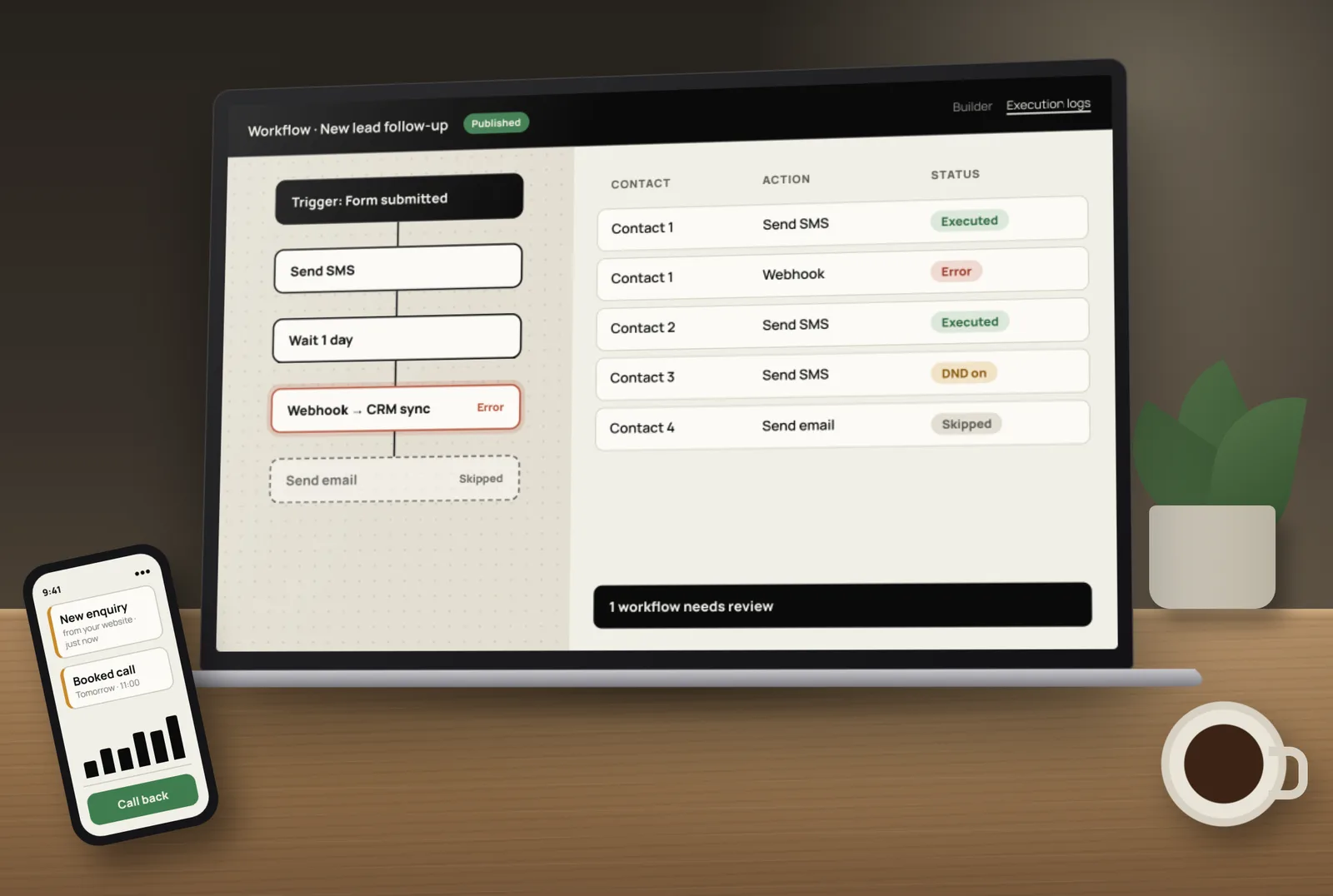
Step 1: Read the execution logs and enrollment history
HighLevel’s article on execution logs and enrollment history explains what you can see:
- Execution Logs — each contact’s progress through the workflow, the actions that ran, and errors highlighted in the Status field or under “View Details”. You can filter by a date range of up to 30 days.
- Enrollment History — whether a contact completed the workflow or was removed by a workflow action.
- Highlight Contact Path — opens the builder with that contact’s route marked, including error nodes, skipped nodes and where they entered or exited.
- Go To Action — jumps straight to the step so you can edit it.
Step 2: Turn on workflow error notifications
HighLevel’s error notifications send an email when a workflow hits an error and add a Needs Review tab to the workflows list. They’re off by default — switch them on in Workflow Settings. HighLevel says sub-account admins receive them automatically and you can add other recipients. The first phase covers webhook and custom webhook actions, premium actions such as Slack, Google Sheets, custom code and ChatGPT, and Facebook and Instagram messaging actions.
Problem 1: The workflow never starts
- The workflow is still in Draft. Only published workflows run.
- The trigger filter doesn’t match. For example, the filter names a different form, calendar or tag.
- The event happened before you published. Triggers don’t look back at past events — add those contacts manually or with a bulk action.
- The contact already went through and re-entry is off. Check “Allow re-entry” in settings.
- The wrong trigger was chosen — for example, “Contact Created” when the contact already existed and was only updated.
- A form submitted from an outside site isn’t connected to HighLevel, so no HighLevel event fires.
Problem 2: Steps are skipped or the wrong path runs
- If/Else conditions check a field or tag that’s empty or spelled differently (“Facebook” vs “facebook”).
- Goal events moved the contact past the step — often working as designed.
- Wait steps are waiting for a condition that never happens, or a time window that hasn’t arrived.
- Another workflow removed the contact — check Enrollment History for “Removed by External Workflow Action”.
- Stop on response ended the workflow when the contact replied.
Problem 3: SMS or emails don’t send
- The contact has no phone or email, or it’s in the wrong format (missing country code).
- The contact unsubscribed or has DND on for that channel.
- US SMS registration isn’t complete. Unregistered business texting to US numbers can be blocked — see our A2P 10DLC registration checklist.
- The phone number or sending domain isn’t set up for that sub-account.
- The message is outside the allowed time window set in the workflow.
- Custom values or fields are empty, so the message reads oddly or fails a check.
Problem 4: Webhooks and outside apps fail
- The receiving URL changed or is down. Test it outside HighLevel.
- The data format is wrong — a required field is missing or named differently.
- A connection expired in Zapier, Make, Google Sheets or Slack, often because the person who connected it left.
- Rate limits — too many requests in a short time.
Our guide to GoHighLevel integrations with Zapier and Make covers how to set these connections up so they fail less often.
Problem 5: Contacts get messages twice
- Two workflows react to the same event.
- Re-entry is on, and the trigger fires again when a field updates.
- Duplicate contacts exist for the same person.
- A snapshot added a second copy of a workflow you already had.
A quick troubleshooting checklist
- Is the workflow published?
- Did the trigger event happen after publishing?
- Do the trigger filters match this contact?
- Is re-entry set the way you need?
- What do the execution logs show for this contact?
- Did a condition, goal or another workflow move them on?
- Can this contact receive this channel (details, DND, registration)?
- Are outside connections still authorised and working?
- After fixing, test again with a test contact before relying on it.
How to prevent workflow errors
- Build small workflows with one job each.
- Use clear names and folders so overlaps are easy to spot.
- Test every branch with your own phone and email before publishing.
- Keep error notifications on and check the Needs Review tab weekly.
- Review old workflows regularly and switch off ones that no longer apply.
Ready-made, tested patterns are in our GoHighLevel workflow automation examples.
Need someone to find and fix the problem for you? Tocal has worked on 50+ GoHighLevel accounts over 3+ years. US businesses can see our GoHighLevel automation expert service, or visit our GoHighLevel service page — with 24/7 support, fast delivery and reasonable pricing. Book a free call and share the workflow that’s misbehaving.
Frequently asked questions
Common causes are that the workflow is still in draft, the trigger filters don’t match the contact, the event happened before publishing, re-entry is off for a contact who already went through, or the wrong trigger type was chosen.
Open the workflow’s Execution Logs and Enrollment History. They show each contact’s steps, errors, and whether they completed or were removed. Highlight Contact Path shows the route in the builder, including skipped and error steps.
Turn on error notifications in Workflow Settings. HighLevel then emails recipients when supported actions fail and lists affected workflows in the Needs Review tab.
Check that the contact has a valid number with country code, hasn’t opted out, that the sub-account has a phone number set up, and that US messaging registration is complete if you text US numbers.
Usually an If/Else condition didn’t match, a goal event moved them forward, stop on response ended the workflow, or another workflow removed them. Highlight Contact Path shows exactly which.
Two workflows may react to the same event, re-entry may be on, or the person may exist as duplicate contacts. Check enrollment history and merge duplicates.
The receiving URL may be down or changed, the data format may be wrong, or the request may hit rate limits. Test the URL outside HighLevel and check the error details in the execution log.
No. Triggers react to new events after the workflow is published. Add existing contacts manually or with a bulk action if they need to go through it.
HighLevel’s article describes filtering logs by preset ranges or a custom range of up to 30 days at a time.
Yes. We review execution logs, find the cause, fix and test the workflows, and set up error alerts so problems are caught early.
[ Tags ]
- GoHighLevel
- Workflows
- Troubleshooting
- Automation
- CRM
[ Need a hand? ]
Let Us Build It For You.
30 minutes, no pressure — we’ll look at your setup and tell you honestly what to fix first.
[ Keep reading ]

[ SEO ]
Local SEO for Jaipur Businesses: How to Show Up in Google Maps
Most Jaipur customers search on their phone and pick from the three businesses in the Google Maps box. Here’s how to earn a place there, step by step.

[ E-Commerce ]
Shopify vs WooCommerce for Indian D2C Brands: Full Cost Comparison
For an Indian D2C brand, the real difference between Shopify and WooCommerce is not the plan price — it’s what you pay on every order as you grow. Here’s the full picture.