
[ GoHighLevel ]
GoHighLevel Integrations with Zapier and Make: A Practical Guide
GoHighLevel connects to thousands of apps through Zapier and Make. Here’s how each connection works, what you can automate, and when a native integration or webhook is the better choice.
We build the funnels, stores and CRMs we write about — this isn't outsourced content.

Short answer: GoHighLevel integrations with Zapier and Make let you connect your CRM to apps that HighLevel doesn’t integrate with natively — accounting tools, project boards, spreadsheets, booking systems and more. On Zapier, HighLevel appears as LeadConnector; on Make, it appears as HighLevel LeadConnector. Use them for data that must move between systems, use HighLevel’s own workflows for everything that happens inside the CRM, and use webhooks when you need full control.
This guide explains what each connector can do (based on Zapier’s and Make’s own documentation), how to choose between them, and how to keep integrations from silently breaking. If you’re new to automation in HighLevel, start with how to build workflows in GoHighLevel.
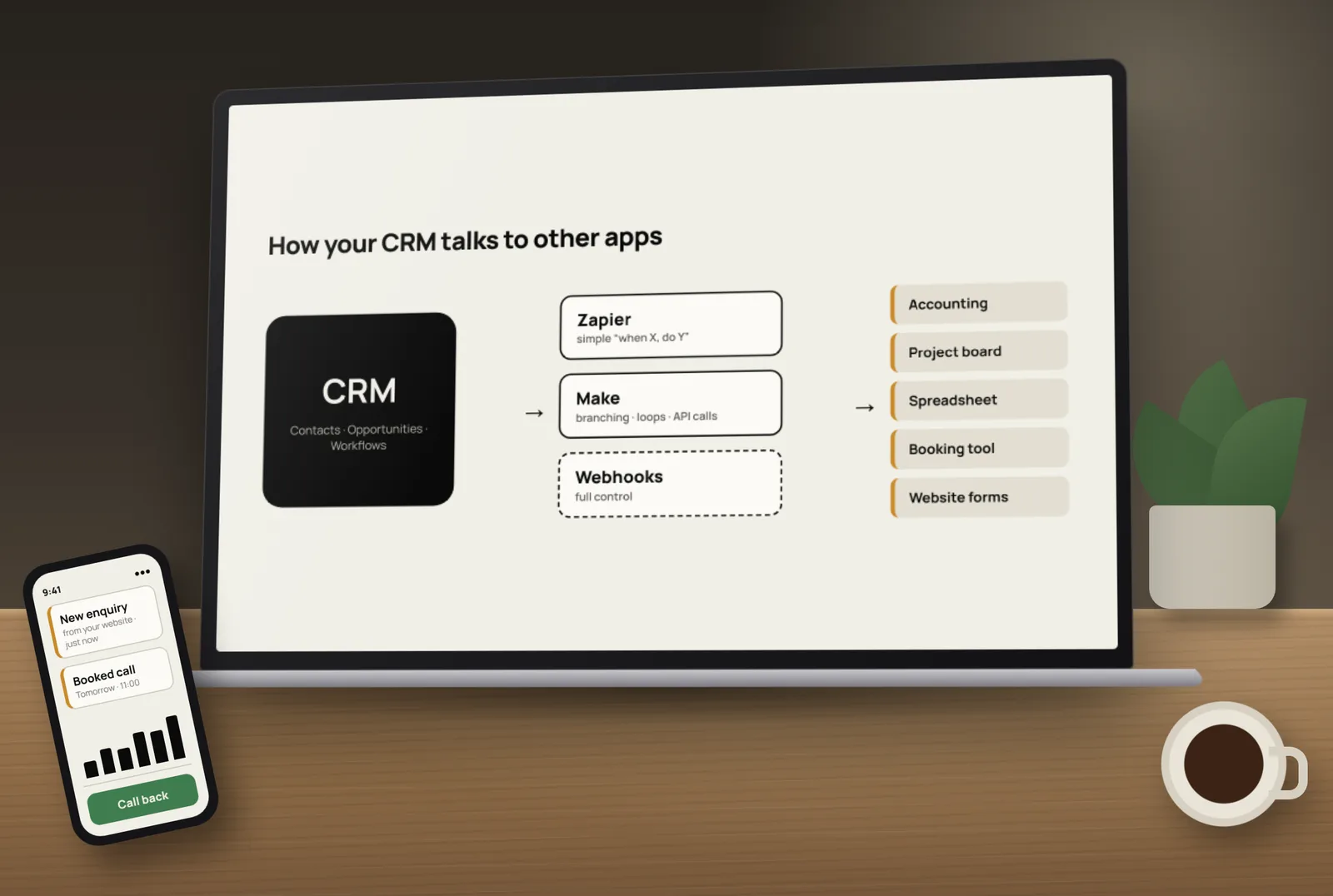
Three ways to connect GoHighLevel to other apps
- Native integrations — built into HighLevel (for example Google, Facebook, Stripe and others in the integrations settings or App Marketplace). Use these first when they exist.
- Zapier or Make — no-code connectors that link HighLevel to thousands of other apps.
- Webhooks and the API — HighLevel workflows can send data to any URL, and developers can use HighLevel’s API for custom builds.
GoHighLevel and Zapier (the LeadConnector app)
Zapier’s guide to getting started with LeadConnector explains the connection: add a new connection in Zapier, choose LeadConnector, sign in to your HighLevel account in the window that opens and grant access. Zapier notes it needs a paid LeadConnector (HighLevel) account.
According to that guide, the Zapier app includes:
- Trigger: Pipeline Stage Changed — fires instantly when an opportunity moves stage.
- Actions: add or update a contact, add or update an opportunity, add a lead to a workflow, stop all workflows for a lead, and add a task.
- Limits: Zapier lists HighLevel’s API rate limits of 100 requests per 10 seconds and 200,000 per day.
The “add lead to workflow” action is the most useful: let Zapier create the contact, then hand it to a HighLevel workflow for messages, tasks and pipeline updates.
GoHighLevel and Make (HighLevel LeadConnector)
Make’s HighLevel LeadConnector app page recommends connecting with OAuth at location (sub-account) or company level; the older API-key connections are marked as deprecated. Its modules include:
- Trigger: Watch Events — an instant webhook trigger for HighLevel events.
- Searches: search and get contacts, list and get opportunities, list and get tasks.
- Actions: create, update and delete contacts, opportunities and tasks; add or remove a contact from a campaign; add notes; and a general “Make an API Call” module for anything else.
Zapier vs Make for GoHighLevel: which should you use?
- Choose Zapier for simple, linear automations (“when X happens, do Y”) that a non-technical team will maintain, and when the other app has a strong Zapier connector.
- Choose Make when you need branching, loops, searches before updates, data transformation or custom API calls — Make’s visual scenarios handle complex logic well.
- Check both for the other app you’re connecting. Sometimes one platform has a much better connector than the other.
- Compare running costs on each platform’s pricing page using your expected number of tasks or operations.
Useful GoHighLevel integrations to build
- New paid invoice in your accounting tool → update the contact and opportunity in HighLevel (mark as won, tag as customer).
- Won opportunity in HighLevel → create a project or task board for delivery in your project tool.
- Form on another website builder → create the contact in HighLevel and add it to your follow-up workflow.
- New contact in HighLevel → add a row to a shared spreadsheet for a partner who doesn’t use the CRM.
- Booking in an outside scheduling tool → create the contact and opportunity in HighLevel so reminders and pipelines stay in one place.
When to use webhooks instead
HighLevel workflows can send data to an outside URL with a webhook action, and can be triggered by incoming data. Webhooks avoid an extra platform in the middle and give you full control over the data sent. They also need more care: someone must build and maintain the receiving end, and HighLevel lists webhook and custom webhook actions among those that can raise workflow errors.
How to keep integrations reliable
- Avoid loops — an integration that updates a contact can retrigger a workflow that calls the integration again.
- Match on email or phone consistently so you don’t create duplicate contacts.
- Name every Zap or scenario clearly with the trigger, apps and purpose.
- Turn on error alerts in Zapier or Make and in HighLevel’s workflow settings.
- Use one owner — someone who checks failed runs every week.
- Document what connects to what, so the next person can fix it.
- Re-authorise connections when staff who created them leave.
If something stops working, our guide on how to fix GoHighLevel workflow errors explains where to look first.
Want your integrations planned and built for you? Tocal has worked on 50+ GoHighLevel accounts over 3+ years. US businesses can see our GoHighLevel integrations service, or visit our GoHighLevel service page — with fast delivery and reasonable pricing. Book a free call to map what needs connecting.
Frequently asked questions
Yes. On Zapier, HighLevel appears as the LeadConnector app. You connect it by signing in to your HighLevel account from Zapier and granting access.
According to Zapier, it has a Pipeline Stage Changed trigger and actions to add or update contacts and opportunities, add a lead to a workflow, stop all workflows for a lead and add a task.
Yes. Make has a HighLevel LeadConnector app with an instant Watch Events trigger, searches for contacts, opportunities and tasks, and actions to create, update and delete records, plus a custom API call module.
Zapier is simpler for straightforward automations. Make is better for complex logic, data transformation and custom API calls. Check which has the better connector for the other app you’re using.
Make recommends OAuth connections at location (sub-account) or company level. Older API-key connections are marked as deprecated.
Not for actions inside HighLevel. Use workflows for messages, tags, tasks and pipeline updates, and use Zapier or Make only to move data to and from other apps.
Yes. Workflows can send data to an outside URL with a webhook action, and developers can use HighLevel’s API for custom integrations.
Usually because the integration creates a new contact instead of updating an existing one, or matches on a field that differs. Use “add or update” actions and match on email or phone consistently.
Zapier’s guide lists 100 requests per 10 seconds and 200,000 requests per day for LeadConnector. Busy integrations should be designed to stay within these limits.
Yes. We plan, build and test integrations using native connections, Zapier, Make or webhooks, and document them so your team can manage them.
[ Tags ]
- GoHighLevel
- Zapier
- Make
- Integrations
- Automation
[ Need a hand? ]
Let Us Build It For You.
30 minutes, no pressure — we’ll look at your setup and tell you honestly what to fix first.
[ Keep reading ]

[ SEO ]
Local SEO for Jaipur Businesses: How to Show Up in Google Maps
Most Jaipur customers search on their phone and pick from the three businesses in the Google Maps box. Here’s how to earn a place there, step by step.

[ E-Commerce ]
Shopify vs WooCommerce for Indian D2C Brands: Full Cost Comparison
For an Indian D2C brand, the real difference between Shopify and WooCommerce is not the plan price — it’s what you pay on every order as you grow. Here’s the full picture.